
Introduction
Managing a maktab or madrasa from a phone is not a compromise — for most Islamic institution administrators and teachers, it is the only realistic way to work. Administrators are often part-time. Teachers work in classrooms without desktop computers. Parents are busy and scattered. A madrasa management app that works on a smartphone, runs offline, and keeps everyone connected is not a nice-to-have. It is the foundation of a functioning digital Islamic institution.
The Ilmify app is purpose-built for this context. It is not a generic school management platform with a mobile view bolted on. The teacher interface, the parent portal, and the admin dashboard are all designed mobile-first — for the way Islamic institution staff and families actually use their phones.
This page explains what the Ilmify app does for each user role, how it differs from alternative tools (including WhatsApp, which many institutions use as a makeshift management system), and how to get your institution onto the app.
What the Ilmify app does
At its core, the Ilmify madrasa management app replaces the combination of tools that most Islamic institutions currently use: paper registers for attendance, notebooks for Hifz progress, WhatsApp groups for parent communication, and Excel spreadsheets for fees.
The app consolidates all of these into a single platform with three user-facing interfaces: one for teachers, one for parents, and one for administrators. All three are connected in real time. When a teacher logs a student’s Sabak in the teacher app, the parent sees it in the parent app within minutes. When an administrator marks a student’s fee as paid, the receipt is generated and the record is updated instantly.
Key capabilities:
| Function | Replaces |
| Daily Hifz / Nazirah progress logging | Handwritten progress notebooks |
| Attendance marking | Paper registers |
| Salah monitoring | Separate paper sheets |
| Parent progress notifications | WhatsApp messages |
| Fee recording and receipts | Excel spreadsheets or cash books |
| Student records | Paper files or separate spreadsheets |
| Progress reports | Manually written parent letters |
Three apps in one: admin, teacher, and parent
The Ilmify app operates differently depending on the user’s role. Each role sees only the interface and data relevant to them.
| Role | What they see | What they can do |
| Administrator | Full institution — all students, all teachers, all classes, finance | Manage everything; generate reports; communicate with all parents |
| Teacher | Their assigned classes and students only | Mark attendance; log Hifz progress; add Tarbiyah notes; message parents |
| Parent | Their child only | View attendance, Hifz progress, Salah monitoring, fee balance; receive notifications |
Role-based access means teachers cannot see other teachers’ classes, and parents can only see their own children. The administrator controls what each user can access.
The teacher app: logging Hifz and attendance on a phone
The teacher interface is designed for a single use case: a teacher sitting in a maktab classroom with 30–60 students, a smartphone, and limited time between lesson activities.
Attendance marking takes under two minutes for a class of 60. Students are listed on screen. The teacher taps “present” or “absent” for each. The system sends an automatic notification to absent students’ parents. No paper. No end-of-day data entry.
Hifz progress logging is the most important function for most maktab and hifz school teachers. The teacher logs:
- Today’s Sabak — the new portion memorised, with the Surah and Ayah range
- Sabaq Para review — whether the recent revision was satisfactory
- Dhor completion — whether the long-term revision session was completed
Each entry takes seconds. The student’s progress record updates automatically. Over a term, this builds a complete picture of every student’s Hifz trajectory — searchable, sortable, and shareable with parents at any time.
Salah monitoring allows teachers or supervisors to record whether students performed each of the five daily prayers. This feeds directly into the student’s Tarbiyah record.
Tarbiyah notes allow teachers to record brief observations about a student’s conduct, character, or personal goals — in the same interface they use for attendance and Hifz.
The teacher app works offline. In classrooms without reliable Wi-Fi, teachers mark attendance and log Hifz progress as usual. Everything syncs automatically when the phone reconnects.
The parent app: real-time visibility for families
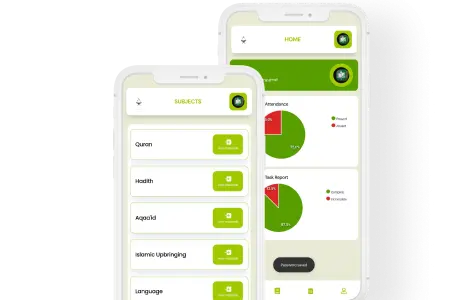
The parent portal is available as a standalone app on iOS and Android. Parents log in with their own credentials and see only their child’s data.
What parents see in real time:
| Section | What is shown |
| Hifz progress | Current Surah, Juz count, Sabak from today’s lesson, recent Sabaq Para status |
| Attendance | Today’s attendance, weekly summary, consecutive absences flagged |
| Salah monitoring | Prayer-by-prayer attendance for the past week |
| Tarbiyah | Latest teacher notes on character and conduct |
| Fee balance | Current balance, recent payments, outstanding amounts |
| Notifications | Absence alerts, progress milestones, school announcements |
| Progress reports | Full termly report available to download |
Multilingual. Parents choose their preferred language when they set up the app: English, Arabic, Urdu, Tamil, or Malayalam. All notifications, reports, and interface text display in that language. The teacher’s input (in whatever language they use) is translated for the parent’s view.
No login friction for parents. Parents access the app with a phone number — no password to remember. A one-time code is sent by SMS each time they log in.
The admin app: running your institution from anywhere
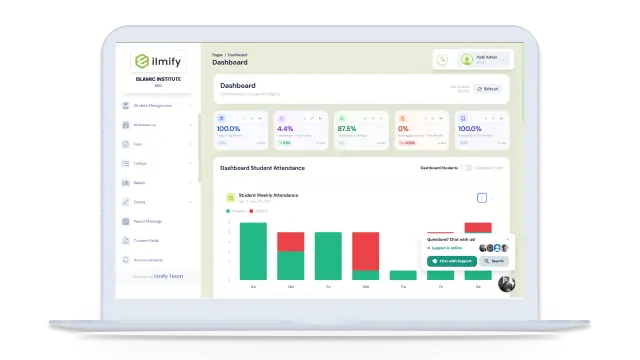
The administrator interface — accessible via web browser on desktop or the mobile app on a smartphone — gives full control of the institution from anywhere.
Administrators can:
- Enrol new students and assign them to classes and teachers
- View the full institution’s attendance for today at a glance
- See which students have not had Hifz logged in the last three days
- Run fee reports — who has paid, who owes, what the total collection is
- Generate progress reports for individual students or the full institution
- Send announcements to all parents or specific class groups
- Manage teacher accounts and class assignments
- Export any data to CSV or PDF for inspection or board reporting
The admin app is the command centre. Everything a part-time administrator needs to run a maktab digitally — without being physically present at the institution for every task — is available from their phone.
App feature comparison: Ilmify vs alternatives
| Feature | WhatsApp + Excel | Generic school app | Ilmify app |
| Hifz / Nazirah tracking | ✗ | ✗ | ✓ |
| Salah monitoring | ✗ | ✗ | ✓ |
| Tarbiyah assessment | ✗ | ✗ | ✓ |
| Islamic-specific attendance types | ✗ | ✗ | ✓ |
| Parent app (iOS + Android) | △ WhatsApp only | ✓ | ✓ |
| Multilingual parent notifications | ✗ | ✗ | ✓ |
| Offline functionality | ✓ (WhatsApp) | ✗ | ✓ |
| Fee management | ✗ | △ | ✓ |
| Progress reports | ✗ | △ | ✓ |
| Role-based access | ✗ | △ | ✓ |
| Islamic calendar scheduling | ✗ | ✗ | ✓ |
| Data backup | ✗ | △ | ✓ |
| GDPR compliance tools | ✗ | △ | ✓ |
| Cost for small maktab | £0 | £10–£50/month | Free – £19/month |
How the app works without internet
Offline functionality is not an afterthought in the Ilmify app — it is a core design requirement. Many maktabs operate in classrooms without reliable Wi-Fi. Boarding madrasas have dormitory buildings with poor coverage. Rural Islamic schools in South Asia, Africa, and Southeast Asia often have intermittent connectivity.
The Ilmify teacher app caches all student data locally on the device. Teachers mark attendance, log Hifz progress, record Salah monitoring, and add Tarbiyah notes exactly as they would with full connectivity. When the device reconnects — whether in ten minutes or several hours — all locally recorded data syncs automatically to the cloud. Parents receive their notifications, and the admin dashboard updates, as soon as sync completes.
The only functions that require active connectivity are parent notification delivery and real-time financial processing. Everything that a teacher does in the classroom works offline.
Getting your institution on the app
Setting up Ilmify for a maktab or madrasa typically takes one afternoon. The process:
Step 1: Sign up (10 minutes)
Create an administrator account at ilmify.app. Choose your institution type and size.
Step 2: Add students (30–90 minutes)
Import student data from a CSV file (if you have Excel records) or add students manually. For a 60-student maktab, manual entry takes approximately 45 minutes.
Step 3: Add teachers and assign classes (15 minutes)
Create teacher accounts and assign each teacher to their classes. Teachers receive a setup link by SMS.
Step 4: Teachers download the app and attend a 20-minute walkthrough (20 minutes)
Teachers download the Ilmify app from the App Store or Google Play. A short walkthrough — done in a group — shows them how to mark attendance and log Hifz progress.
Step 5: Invite parents (ongoing)
Parents receive an SMS invitation with their child’s login link. Most parents are active on the app within 48 hours of receiving the invitation.
Total time from sign-up to fully live: typically 3–5 hours for a maktab of 60–100 students.
Conclusion
The Ilmify madrasa management app brings together everything an Islamic institution needs to run digitally — Hifz tracking, attendance, Salah monitoring, Tarbiyah assessment, fee management, and parent communication — in a mobile-first platform designed for the way Islamic schools actually work. Teachers use it in the classroom. Parents use it on their commute. Administrators use it from home, from the car, or from anywhere they have their phone.
The app replaces the WhatsApp group. It replaces the Excel spreadsheet. It replaces the paper register. And it gives parents the real-time visibility into their child’s Islamic education that they deserve.
Download Ilmify or start free → ilmify.app
Related articles
- Book a Free Demo of Ilmify →
- Ilmify Pricing and Plans →
- Hifz Tracking for Islamic Schools →
- Moving from WhatsApp to School Management Software →
- Best Madrasa Management Software in 2026 →
- Cloud-Based Madrasa Management System →
- Signs Your Maktab Has Outgrown WhatsApp →
- Digital Hifz Tracking System Setup →




 Arabic
  English
  Malay
Malay  Urdu
Urdu