

Introduction
Most maktabs and madrasas in 2026 are still managing their institutions with paper registers, WhatsApp groups, and Excel files. A small number have tried on-premise software — systems installed on a local computer. But the fastest-growing category is cloud-based madrasa management systems: platforms that run entirely online, accessible from any device, with no installation, no local servers, and no IT maintenance required.
The difference is not just technical. A cloud-based system changes what is possible for a community Islamic institution. An administrator can approve a student enrolment from home. A teacher can log Hifz progress on their phone between lessons. A parent in a different country can see their child’s attendance report in real time. None of this is possible with a paper register or a local spreadsheet.
This guide explains what cloud-based means in practice for a madrasa, what to look for when evaluating cloud platforms, how to think about the offline question, and how to transition from manual systems — without disruption.
What cloud-based means — and why it matters for madrasas
“Cloud-based” means the software runs on remote servers — accessed via a web browser or mobile app — rather than on a computer installed at the institution. The data is stored and processed by the software provider, not on the madrasa’s own hardware.
For a mainstream school with a dedicated IT team and server room, on-premise software is manageable. For a maktab or madrasa run by a part-time administrator and volunteer teachers, it is not. The practical meaning of “cloud-based” for an Islamic institution is:
- No installation. The system is accessed through a web browser or app. There is nothing to install on any computer.
- No local server. There is no server to maintain, back up, update, or repair. If the madrasa’s computer breaks, the data is unaffected.
- Automatic updates. New features and security patches are applied by the provider. Administrators do not need to manage software updates.
- Access from anywhere. The administrator can log in from home, from a phone, from a different country. Teachers can mark attendance from the classroom without going to an office computer.
- Multi-device access. The same data is accessible from any device — laptop, tablet, smartphone — simultaneously by multiple authorised users.
For the vast majority of maktabs and madrasas — which do not have IT staff, server infrastructure, or a permanent office computer — cloud-based is not a luxury. It is the only realistic model.
Cloud vs on-premise vs WhatsApp/Excel: the real comparison
| Factor | Paper / WhatsApp / Excel | On-premise software | Cloud-based system (Ilmify) |
| Installation required | ✗ None | ✓ Significant | ✗ None |
| IT staff required | ✗ | ✓ | ✗ |
| Access from home / mobile | ✗ | △ Difficult | ✓ Any device, anywhere |
| Data backup | Manual or none | Manual IT task | ✓ Automatic, continuous |
| System updates | Not applicable | Manual, costly | ✓ Automatic, included |
| Multiple users simultaneously | △ Partial | ✓ | ✓ |
| Works if madrasa computer breaks | ✗ Data at risk | ✗ Data at risk | ✓ Data unaffected |
| Parent access portal | ✗ | △ | ✓ Real-time |
| Hifz tracking | ✗ | △ (if Islamic software) | ✓ |
| Salah monitoring | ✗ | ✗ | ✓ |
| Setup time | 0 (already in use) | Weeks to months | Hours |
| Monthly cost | ✗ Free | £50–£500+/month | Affordable community pricing |
| Offline capability | ✓ | ✓ | ✓ (with offline mode) |
The most common comparison for Islamic institutions is not cloud vs on-premise — it is cloud vs WhatsApp and Excel. When framed that way, the advantages of a cloud-based system are significant across almost every dimension.
Six advantages of cloud-based madrasa management
Advantage 1: Instant access for every stakeholder
A cloud system gives every authorised stakeholder — administrator, teacher, parent, student — their own access point, updated in real time. The administrator does not need to be physically present at the madrasa to check on student records. The teacher does not need to transfer paper notes to a computer at the end of the day. The parent does not need to wait for a termly report to know how their child is progressing.
Advantage 2: Automatic, continuous data backup
Data stored in a cloud system is backed up continuously by the provider — typically across multiple servers in different locations. The probability of data loss in a properly managed cloud system is orders of magnitude lower than data stored on a single local computer or in a folder of Excel files. For an institution whose student records, Hifz progress data, and fee records represent years of irreplaceable information, this matters enormously.
Advantage 3: No IT maintenance burden
Community Islamic institutions do not have IT departments. When an on-premise system has a technical problem, the institution must either find a volunteer with technical skills, pay a contractor, or leave the problem unresolved. Cloud systems eliminate this burden — technical maintenance, security patching, and server management are handled entirely by the provider.
Advantage 4: Scale without infrastructure cost
As an institution grows — from 50 students to 200, from one branch to five — a cloud system scales with it. There is no need to upgrade servers, purchase additional licences for local machines, or restructure a local network. The cloud infrastructure scales on the provider’s side.
Advantage 5: Real-time parent engagement
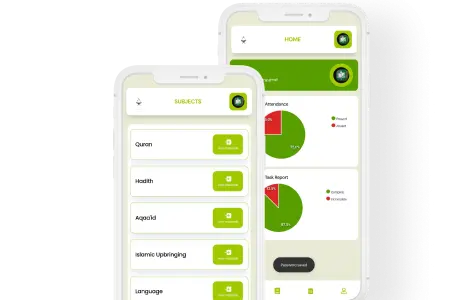
The cloud model enables the parent portal. Parents log into an app — available on any smartphone — and see their child’s attendance, Hifz progress, Salah monitoring, and fee balance in real time. This level of parent engagement is structurally impossible with a paper-based or local-computer-based system.
Advantage 6: Business continuity
If a madrasa’s administrator resigns, travels, or is unavailable, data stored in a cloud system is immediately accessible to whoever takes over. There is no “the records are on Ustadha Fatima’s laptop and we do not have her password” scenario — which is disturbingly common in WhatsApp-and-Excel institutions.
What to look for in a cloud madrasa system
Not all cloud systems are equal. When evaluating a cloud-based madrasa management platform, use this checklist.
| Evaluation criterion | What to look for |
| Islamic-specific features | Native Hifz tracking, Tarbiyah module, Salah monitoring — not generic grade tracking |
| Offline mode | The system must work when internet connectivity is poor or absent |
| Mobile-first design | Teachers and wardens must be able to use it on a smartphone without difficulty |
| Multilingual support | Parent communication in Arabic, Tamil, Urdu, or Malayalam — not English only |
| Data ownership | You must be able to export all your data at any time without restriction |
| Data location | Know where your data is stored (jurisdiction matters for GDPR in the UK/EU) |
| Security standards | Look for encryption at rest and in transit, and clear access control policies |
| Uptime guarantee | A reliable cloud system should offer 99%+ uptime — the platform must be available when teachers arrive for class |
| Pricing transparency | Monthly pricing should be clear and scale affordably for small institutions |
| Support availability | Community Islamic institutions often operate outside normal business hours |
The offline question: what happens without internet?
The most common objection to cloud-based systems from administrators in developing countries — and in some areas of the UK and North America with unreliable connectivity — is: “What happens if the internet goes down?”
This is a legitimate concern. A system that cannot function without internet connectivity is not reliable for a maktab that operates in an area with patchy Wi-Fi, or for a residential madrasa where the classroom blocks may not have consistent coverage.
The answer is offline mode. A properly built cloud system — unlike a simple web application — includes an offline mode that allows teachers to mark attendance, log Hifz progress, and record notes without an internet connection. When connectivity is restored, the data syncs automatically.
What offline mode should cover:
| Function | Offline-capable? |
| Mark class attendance | ✓ Must work offline |
| Log Hifz Sabak progress | ✓ Must work offline |
| Record Salah attendance | ✓ Must work offline |
| View student records | ✓ Must work offline (cached) |
| Send parent notifications | ✗ Requires connectivity (sends on reconnection) |
| Process fee payments | ✗ Requires connectivity |
| Generate reports | △ Cached data available; full report on reconnection |
Ilmify’s offline mode covers the core teacher functions — attendance marking, Hifz progress logging, and Salah monitoring — ensuring that the day’s academic work is never lost due to connectivity issues.
Data security and privacy in a cloud system
Storing student data in the cloud raises understandable questions about privacy and security. These concerns are legitimate — and addressable.
What you should verify with any cloud provider:
| Security question | What good practice looks like |
| Where is data stored? | Server location declared; UK/EU data stays in UK/EU for GDPR compliance |
| How is data encrypted? | AES-256 encryption at rest; TLS 1.2+ in transit |
| Who can access student data? | Role-based access control; administrators cannot see teacher salary data; teachers cannot see other classes |
| What happens on data breach? | Clear breach notification policy; obligations under GDPR / local data law |
| How long is data retained? | Configurable retention periods; data deleted on request |
| Can I export my data? | Full CSV export available at any time; no proprietary lock-in |
| Is the platform GDPR compliant? | For UK/EU institutions, explicit GDPR compliance is required |
Ilmify stores data in accordance with applicable data protection law, uses encryption at rest and in transit, implements role-based access control, and provides full data export at any time.
Cost comparison: cloud vs self-hosted vs manual
The true cost of any management approach includes not just software licensing, but the time cost of administration.
| Cost element | Paper/WhatsApp/Excel | On-premise software | Cloud (Ilmify) |
| Software licence | £0 | £500–£3,000/year | £20–£150/month |
| Server hardware | £0 | £500–£2,000 | £0 |
| IT maintenance | £0 (but fragile) | £500–£2,000/year | £0 |
| Admin time (weekly) | 8–15 hrs/week | 4–6 hrs/week | 1–2 hrs/week |
| Admin time cost (at £10/hr) | £4,000–£7,500/year | £2,000–£3,000/year | £500–£1,000/year |
| Data loss risk | High | Medium | Very low |
| Parent communication quality | Low | Medium | High |
| Total true annual cost | £4,000–£7,500 | £3,000–£8,000 | £740–£2,800 |
The cloud system is consistently the lowest total cost of ownership for a community Islamic institution — despite having a visible monthly fee, which the paper-and-WhatsApp approach does not.
How to migrate to a cloud-based system
Migration from paper or Excel to a cloud system does not have to be a big-bang change. A phased approach — moving one function at a time — minimises disruption and builds confidence among staff.
Step 1: Import existing student data
Export your current student list from Excel (or type it in if on paper). Most cloud platforms including Ilmify accept CSV imports. This typically takes one to two hours for a maktab of 100 students.
Step 2: Set up teacher accounts
Create teacher accounts and assign classes. Teachers download the app on their smartphones.
Step 3: Start with attendance only
For the first two weeks, use the system only for attendance marking. Do not change anything else. Let teachers get comfortable with the interface.
Step 4: Add Hifz tracking
Once attendance is running smoothly, activate Hifz tracking. Teachers begin logging daily Sabak in the app alongside attendance.
Step 5: Activate parent portal
Invite parents to the parent app. Most will set it up within a few days once they understand they can see their child’s progress in real time.
Step 6: Add fee management
Move fee recording into the system. This is typically the last step because it requires the most process change.
| Step | Function added | Typical timeline |
| 1 | Student data imported | Day 1 |
| 2 | Teacher accounts set up | Day 1–2 |
| 3 | Attendance live | Week 1–2 |
| 4 | Hifz tracking live | Week 3–4 |
| 5 | Parent portal active | Week 4–5 |
| 6 | Fee management live | Week 6–8 |
Conclusion
A cloud-based madrasa management system is not a luxury for well-resourced Islamic schools. It is the most practical, most affordable, and most resilient approach for any Islamic institution in 2026 — from a 30-student Saturday maktab to a 500-student residential Darul Uloom. The alternative — paper registers, WhatsApp groups, and Excel files — is not free. It costs administrator time, data security, parent trust, and institutional continuity that compound into a significant burden year after year.
Ilmify is a purpose-built cloud-based Islamic institution management system, designed for exactly the context in which maktabs and madrasas operate: community-funded, volunteer-staffed, multilingual, and increasingly expected to deliver the transparency and professionalism that parents and regulatory bodies demand.
Move your madrasa to the cloud today → Try Ilmify free
Related articles
- Madrasa ERP vs School ERP: Why Generic Systems Fail →
- What Is an Islamic LMS? →
- How to Digitise Your Madrasa Records →
- Moving from WhatsApp and Excel to School Management Software →
- The Real Cost of Manual Maktab Management →
- Digital Transformation in Islamic Schools →
- Signs Your Maktab Has Outgrown WhatsApp →
- Islamic School Management Software Pricing →




 Arabic
  English
  Malay
Malay  Urdu
Urdu