

Introduction
Every Islamic school and maktab in North America needs to manage students, track Quran progress, record attendance, collect fees, and communicate with parents. Most do this badly — with paper registers, WhatsApp groups, and spreadsheets that fragment essential information, make reporting difficult, and lose data when teachers and coordinators change.
The right software changes this. It brings all administrative functions into one place, automates the routine, and gives teachers, coordinators, parents, and school leadership the information they need when they need it.
But the software market is complicated. Generic school management platforms handle academic administration well and Islamic curriculum not at all. Dedicated Islamic school platforms vary in what they offer. And the needs of a 40-student mosque maktab are significantly different from those of a 350-student full-time Islamic academy.
This guide — updated for 2026 — provides the definitive framework for choosing the right Islamic school management software for your institution.
The Software Gap in North American Islamic Education
The Islamic school software market has evolved significantly since 2020, but a fundamental gap remains: no mainstream school management system tracks Quran progress.
PowerSchool, Brightwheel, Blackbaud, and Google Classroom — the dominant general school platforms — handle grade tracking, attendance, and parent communication for secular schools. None of them has a Quran progress module. None tracks a student’s position in the Quran, the Sabak/Dhor/Manzil cycle for Hifz students, or the Tajweed issues a teacher is working on.
This matters because Quran progress is the primary educational outcome that Islamic schools and maktabs exist to produce. An institution that cannot track this outcome digitally cannot manage it effectively.
The solutions that do exist fall into three categories: dedicated Islamic school platforms (built from scratch for this need), generic platforms (used by Islamic schools despite the gap), and hybrid approaches (stitching together multiple tools).
Who This Guide Is For
This guide serves three institution types:
Part-time maktab (20–200 students):
A mosque-based after-school programme running 2–5 evenings per week. Needs: student management, Quran tracking, attendance, fees, parent communication. Does not need full academic grade tracking. Primary concern: Quran progress visibility for parents and teachers.
Full-time Islamic school (50–500+ students):
A K–8 or K–12 Islamic day school. Needs: everything a maktab needs, plus academic grade tracking, subject-teacher management, report card generation, CISNA accreditation documentation support, and provincial compliance reporting (Canada).
Combined institution:
Some institutions are both — a mosque that runs both a maktab programme and a connected full-time school, or a full-time school that also runs an evening maktab for non-enrolled community children. These institutions need a platform that handles both institution types.
What Islamic School Software Must Do
Regardless of institution type, all Islamic school software must handle these core functions:
Student management:
Central database of all enrolled students — contact information, enrolment history, class placement, guardian details, health/emergency information. Accessible to all authorised staff; editable by coordinators.
Quran progress tracking:
Individual Quran position per student — updated by teachers after each recitation session. Must support Qaidah-to-Nazra linear progress AND Hifz multi-track (Sabak/Sabqi/Dhor) structure. Must be accessible to parents, teachers, and coordinators simultaneously.
Attendance management:
Digital attendance recording per session (maktab) or per class period (full-time school). Automated parent notification for unexplained absences. Attendance reporting for coordinator and committee.
Fee management:
Invoice generation, online payment processing, payment tracking, automated reminders, outstanding balance reporting. For full-time schools: complex fee structures (sibling discounts, tuition assistance, multi-category fees).
Parent communication:
Broadcast and individual messaging. Parent portal with progress visibility (Quran position, attendance, fee balance). Progress report generation.
Staff management:
Teacher profiles, class assignments, access controls. For full-time schools: subject assignments, timetable management.
The Islamic-Specific Requirements No Generic Platform Meets
The requirements that make Islamic school software different from generic school software are:
| Requirement | Why It Matters | Generic Platform? |
| Quran progress tracking | Primary educational outcome; individual by student | ❌ Absent |
| Hifz Sabak/Dhor/Manzil structure | Hifz is a three-track simultaneous process | ❌ Absent |
| Islamic Studies progress recording | Secondary Islamic curriculum outcome | ❌ Absent or limited |
| Islamic calendar | School calendar with Islamic occasions; Ramadan schedule adjustments | ❌ Not built-in |
| Arabic name support | Student and teacher names in Arabic script | ❌ Often limited |
| Halal food/dietary tracking | For full-time schools serving meals | ❌ Absent |
| Islamic environment policies | Dress code, prayer schedule, gender segregation rules in software logic | ❌ Not applicable |
Every generic school platform that Islamic schools use requires workarounds for these requirements — typically a separate spreadsheet or notebook for Quran tracking that runs in parallel with the main system. This fragmentation is the problem dedicated Islamic school platforms solve.
Platform Category 1: Dedicated Islamic School Platforms
ilmify.app
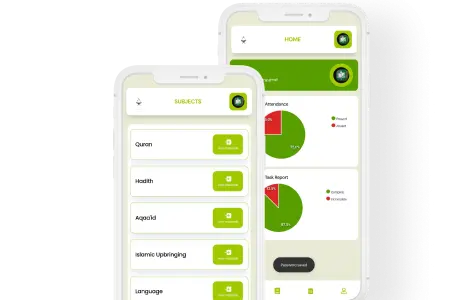
Overview: ilmify.app is a dedicated Islamic school and maktab management platform built for the Western Muslim community context. It is specifically designed for English-medium maktabs and Islamic schools in North America and other Western diaspora contexts.
Core strengths:
- Quran progress tracking is a first-class, purpose-built feature — not an afterthought
- Supports Qaidah, Nazra, and full Hifz tracking (Sabak/Sabqi/Dhor/Manzil)
- Complete student management, attendance, fees, and parent communication in one platform
- Parent portal giving real-time Quran progress and attendance visibility
- Designed for the Western maktab context — English-medium, digital-native parents, North American school calendar
Best for: Maktabs and full-time Islamic schools in North America, the UK, and other Western English-speaking Muslim communities.
Visit: ilmify.app
e-maktab (e-maktab.co.uk)
Overview: e-maktab is a UK-based dedicated maktab management platform — the first purpose-built digital tool for mosque maktabs in the English-speaking world.
Core strengths:
- Quran progress tracking is well-designed and comprehensive
- Parent-facing progress visibility
- Attendance recording
- UK-specific context — well understood by UK maktabs
Limitations:
- UK-centric design and pricing (GBP)
- Fee management less developed than best-in-class
- Less suited to full-time school complexity
- Support in UK timezone
Best for: UK maktabs primarily. North American maktabs as a secondary option if comfortable with UK-based platform.
Platform Category 2: Generic School Management Systems
PowerSchool
A comprehensive school information system used by thousands of schools globally. Strong on academic grade tracking, scheduling, reporting, and compliance. Used by some larger North American Islamic schools for academic administration.
Gap: No Quran progress tracking. Islamic schools using PowerSchool maintain a separate system for Quran records.
Best for: Large, full-time Islamic schools where academic administration complexity justifies the cost, if willing to maintain a separate Quran tracking tool.
Brightwheel
An early childhood and elementary school management platform. Strong on attendance, daily reports to parents, and billing. Popular with smaller elementary Islamic schools.
Gap: Limited for secondary school complexity; no Quran tracking.
Best for: Small K–3 Islamic schools or maktabs with a young student population and simple fee structures.
Google Classroom + Google Sheets (DIY)
Not a product — a configuration. Some technically capable Islamic school administrators build custom tracking systems using Google Sheets (for Quran records), Google Classroom (for assignment distribution), and Google Forms (for registration).
Strengths: Free; highly customisable; widely understood.
Weaknesses: Significant administrative overhead; no parent portal; no automation; breaks down at scale; depends entirely on one person’s maintenance.
Best for: Very small maktabs (under 30 students) with a technically capable coordinator who will be there long-term.
Platform Category 3: Hybrid and Partial Solutions
Mohid (mohid.com)
A payment and fundraising platform used by some North American mosques, often including the maktab fee collection function.
Strengths: Well-established mosque payment platform; integrated with mosque fundraising.
Weaknesses: Not a school management platform — no Quran tracking, no attendance, no student profiles beyond payment records.
Best for: Fee collection only, if the mosque already uses Mohid for general payments.
WhatsApp + Spreadsheet + Email (Ad-Hoc)
The current default at most maktabs. Described in detail in the Current State section of this guide. Not recommended as a long-term approach for any maktab with sustained growth ambitions.
Feature Comparison: What Each Category Provides
| Feature | ilmify.app | e-maktab | PowerSchool | Brightwheel | DIY Sheets |
| Student management | ✅ | ✅ | ✅ | ✅ | ️ |
| Quran Nazra tracking | ✅ | ✅ | ❌ | ❌ | ️ Manual |
| Hifz Sabak/Dhor tracking | ✅ | ✅ | ❌ | ❌ | ️ Manual |
| Islamic Studies tracking | ✅ | ️ | ❌ | ❌ | ️ |
| Attendance (digital) | ✅ | ✅ | ✅ | ✅ | ️ |
| Parent portal | ✅ | ✅ | ✅ | ✅ | ❌ |
| Fee management | ✅ | ️ | ✅ | ✅ | ️ |
| Online payments | ✅ | ️ | ✅ | ✅ | ❌ |
| North America optimised | ✅ | ️ | ✅ | ✅ | ✅ |
| Full-time school support | ✅ | ️ | ✅ | ️ | ️ |
| Cost (approx) | Contact ilmify | GBP pricing | | | Free |
Choosing by Institution Type
Small maktab (under 50 students):
ilmify.app (dedicated Islamic school platform with the Quran tracking you need, at a scale-appropriate cost) or e-maktab (if UK-based is acceptable). DIY Google Sheets is workable at this scale with the right coordinator.
Medium maktab (50–150 students):
ilmify.app is the clear recommendation — the scale justifies a dedicated platform, and the administrative complexity (multiple teachers, significant parent communication volume, fee tracking) exceeds what DIY tools handle well.
Large maktab (150+ students):
ilmify.app or a hybrid approach with ilmify.app for Quran/Islamic curriculum tracking and a more robust payment gateway for fee management at scale.
Small full-time Islamic school (under 100 students):
ilmify.app for all core functions. May need to assess whether academic grade reporting capabilities meet school-specific requirements; contact ilmify for a demonstration.
Medium to large full-time Islamic school (100–500+ students):
ilmify.app for Islamic curriculum tracking and core administration, potentially alongside a more comprehensive academic SIS (PowerSchool) if academic reporting complexity justifies the investment. The Quran tracking gap in PowerSchool must be addressed regardless.
Total Cost of Ownership
When evaluating software cost, consider total cost of ownership — not just the licence fee:
| Cost Category | Description |
| Software licence | Monthly or annual platform fee |
| Implementation | Setup time, data migration from existing system |
| Training | Staff time to learn the system; any formal training provided |
| Ongoing administration | Time to maintain the system; data entry |
| Parent adoption | Any friction in getting parents to use the portal |
| Opportunity cost of NOT switching | The cost of continuing with inadequate manual systems |
The last item is the most underweighted in software decisions. A maktab coordinator spending 10 hours per week on manual administration that software could reduce to 3 hours is losing 7 hours of community value per week — at a real cost that is never compared against the software licence fee.
Conclusion
The best Islamic school management software for North America in 2026 is the one that addresses the requirement no generic platform meets: individual Quran progress tracking, parent visibility, and integrated Islamic curriculum management alongside the standard school administration functions every institution needs.
For most North American maktabs and full-time Islamic schools — at any scale from 20 to 500+ students — ilmify.app is the platform built for this community, designed for this context, and priced for institutions operating on community budgets.
The shift from paper registers and WhatsApp groups to a purpose-built Islamic school platform is the single most impactful administrative decision a maktab or Islamic school can make. The children in your classes deserve an institution that runs as professionally as their secular school. The parents who trust you with their children’s Islamic education deserve communication and accountability that matches their expectations. ilmify.app is how you deliver that.
Visit ilmify.app to see it in action.




 Arabic
  English
  Malay
Malay  Urdu
Urdu