

Introduction
Ask a maktab administrator in India what software they use to manage their institution and the most common answers are: “WhatsApp,” “an Excel sheet,” or “nothing — we use registers.” A small but growing number will name a purpose-built Islamic education platform. Almost none will name a generic school management system — not because they haven’t tried them, but because they’ve tried them and abandoned them within weeks.
Finding the best maktab management software for India in 2026 requires understanding what Indian maktabs actually need — which is meaningfully different from what Indian schools need, and very different from what Western Islamic education software was built for.
This guide maps the landscape as it exists in 2026: the categories of tools available, what they do and don’t do, and how to make the right choice for your specific institution.
What Maktab Management Software Actually Needs to Do
Before evaluating any specific tool, define what “working” means for your maktab. The core administrative tasks that maktab software needs to support are:
| Task | Frequency | Complexity |
| Student attendance | Daily | Low — mark present/absent per student |
| Quran progress tracking | Daily | Medium — Sabak, Sabak Para, Dhor, Manzil |
| Parent notifications | Daily/weekly | Low — automated based on attendance/progress |
| Fee collection tracking | Monthly | Medium — who has paid, who is outstanding |
| Teacher attendance | Daily | Low — similar to student attendance |
| Examination registration | Annual | Low — generate student lists |
| Progress reports | Termly/annual | Medium — summarise progress per student |
A tool that handles all seven well is excellent. A tool that handles the top four well is usable. A tool that misses Quran progress tracking — the most distinctive Islamic education requirement — is the wrong tool.
Why Generic School Software Fails for Maktabs
India has a large, competitive market for school management software — EDUMARSHAL, Fedena, MyClassCampus, SchoolMint, and dozens of others. None of them work well for maktabs, for five fundamental reasons:
| Failure Point | Why It Matters |
| No Quran progress tracking | The core pedagogical need of any maktab — Sabak, Sabak Para, Dhor, Manzil — does not exist in generic school software. Teachers will not adapt their workflow to a tool that forces them to use “lesson number” instead of Sabak. |
| Designed for full-time schools | Part-time evening/weekend session structures, holiday patterns around Islamic calendar, and session-based rather than period-based timetables are not supported. |
| Pricing for institutional budgets | Generic school software often costs ₹2,000–₹10,000+/month — designed for schools with tuition income. Most maktabs operate on budgets that cannot absorb this. |
| No Urdu / Arabic interface | Teachers and administrators who think in Urdu or Arabic are poorly served by English-only interfaces. |
| Overcomplicated for maktab scale | Timetable management, library modules, bus tracking, canteen management — features relevant to a 1,000-student school are overwhelming noise for a 30-student maktab. |
The Core Feature Checklist for Indian Maktabs
Use this checklist when evaluating any tool:
Must-Have Features
High-Value Additional Features
Nice-to-Have
Category 1: Purpose-Built Islamic Education Platforms
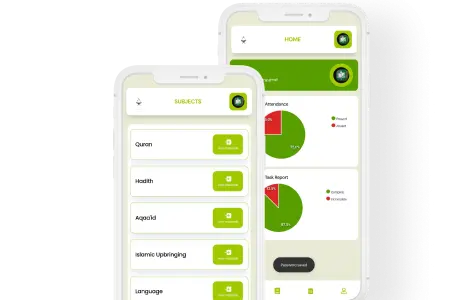
Ilmify
Overview: Purpose-built for South Asian Islamic education institutions — maktabs, madrasas, Hifz schools, and integrated Islamic schools across India, Pakistan, Bangladesh, and beyond.
Key strengths:
- Native Quran progress tracking with Sabak, Sabak Para, Dhor, Manzil — and Aamuktha for South Indian institutions
- Mobile-first Android app designed for daily teacher use
- Automated WhatsApp parent notifications for attendance and progress
- Fee tracking with UPI integration
- Supports multiple board curricula — Deeniyat, MTB, Samastha, and independent
- Designed specifically for part-time maktab session structures
- Pricing designed for maktab budgets — free tier for small institutions
Limitations: Newer platform; advanced reporting features still developing; some enterprise-level customisation not yet available.
Best for: Any Indian maktab looking for a purpose-built solution — Deeniyat, Samastha, MTB, or independent.
Maktab Manager (and similar region-specific tools)
Several smaller tools have been developed specifically for the Indian/South Asian maktab context. Evaluation criteria remain the same: native Quran tracking terminology, mobile-first, affordable pricing, and WhatsApp integration.
What to check: Quran tracking uses exact Indian terminology (not generic “lesson tracking”); pricing is transparent and sustainable; the product is actively maintained and updated.
Category 2: General School Management Adapted for Maktabs
Several general school management platforms have been configured or marketed for Islamic education contexts. These are worth evaluating with realistic expectations:
What they typically offer: Student enrolment, fee management, parent communication portals, basic attendance.
What they typically miss: Native Quran progress tracking (the most important gap), part-time session structures, Islamic calendar integration, affordable pricing for maktab budgets.
Verdict: Potentially usable if Quran progress tracking is handled separately (e.g., in a dedicated Quran tracking spreadsheet alongside the general platform), but creates a fragmented workflow. Not recommended as a primary maktab management solution unless the gap is explicitly addressed.
Category 3: Free and Freemium Tools (Non-Maktab-Specific)
Many maktabs currently use combinations of free tools:
Role: Parent communication, teacher coordination, announcements
Strength: Universal adoption; no cost; familiar
Limitation: Not a management tool — no attendance records, no Quran tracking, no fee management; no data persistence or searchability
Google Sheets / Excel
Role: Student register, attendance tracking, fee ledger
Strength: Free; flexible; familiar to technically comfortable users
Limitation: Requires spreadsheet skills; no mobile-optimised daily entry; no parent-facing interface; no automated notifications; multiple spreadsheets create administrative burden
Google Forms + Sheets
Role: Attendance collection, feedback surveys
Strength: Free; can create basic mobile-friendly daily attendance
Limitation: Not designed for this use case; data organisation requires ongoing manual work
Verdict for free tools: Combination of WhatsApp + Google Sheets is a functional minimum for maktabs under 20 students with a technically comfortable administrator. Above 20–25 students, the time cost and data reliability limitations make a purpose-built tool significantly more efficient.
Feature Comparison Matrix
| Feature | Ilmify | Generic School Software | WhatsApp + Sheets |
| Student enrolment | ✅ | ✅ | Manual |
| Daily attendance (mobile) | ✅ | ✅ (often desktop) | Manual |
| Quran progress — Sabak/Dhor/Manzil | ✅ Native | ❌ Not available | Manual |
| Aamuktha (South India) | ✅ | ❌ | Manual |
| WhatsApp parent notifications | ✅ Automated | ❌ / Partial | Manual |
| Fee tracking + UPI | ✅ | ✅ (often complex) | Manual |
| Teacher attendance | ✅ | ✅ | Manual |
| Works offline / slow connection | ✅ | Variable | ✅ |
| Part-time session structure | ✅ | ❌ | N/A |
| Islamic calendar support | ✅ | ❌ | Manual |
| Urdu interface | ✅ | ❌ | N/A |
| Monthly cost | Free–₹999 | ₹2,000–₹10,000+ | Free |
| Examination list generation | ✅ | ✅ | Manual |
How to Evaluate a Tool Before Committing
Before adopting any maktab management tool, run this evaluation process:
1. Request a free trial or demo. Any reputable provider offers this. If they don’t, treat this as a red flag.
2. Test Quran progress tracking specifically. Open the tool and try to record a student’s Sabak, Sabak Para, and Dhor for a single day. If it takes more than 60 seconds or requires adapting the workflow significantly, it will not be used consistently.
3. Test on the actual device the teacher will use. Not on your laptop — on the Android phone your teacher carries. Does it load quickly? Is the interface navigable with one thumb? Does it work when the WiFi is weak?
4. Send a test parent notification. Does the automated message read naturally in Urdu or the relevant language? Does it arrive via WhatsApp or require the parent to install a separate app?
5. Check data export. Can you export all student records to Excel or CSV? If not, you are locked in with no exit strategy.
6. Ask about pricing transparency. What is the cost per month for your student numbers? Are there hidden fees for features, support, or storage?
What Different Maktab Types Need
| Maktab Type | Primary Software Need |
| Small Deeniyat maktab (under 30 students) | Simple attendance + Quran tracking + parent WhatsApp notifications |
| Large Deeniyat maktab (50+ students) | Above + fee management + examination registration + teacher management |
| Samastha/Kerala madrasa | Malayalam-medium parent communication + 14-level progress tracking |
| MTB-affiliated integrated school | Student management across Islamic + secular tracks + fee management |
| Dedicated Hifz school | Intensive Sabak/Sabak Para/Dhor/Manzil tracking + Aamuktha for South India |
| Multi-teacher maktab | Role assignment + separate teacher dashboards |
| Wifaqul Makatib federation body | Overview dashboard across multiple affiliated institutions |
Frequently Asked Questions
Q: Is free maktab management software available in India?
Yes — Ilmify offers a free tier for small institutions (typically under 25–30 students). Google Sheets combined with WhatsApp is functionally free for very small maktabs. Purpose-built free tools with full feature sets are rare — most require a modest subscription at scale.
Q: Do we need internet to use maktab management software?
The best tools for Indian maktabs are designed to work on slow connections or offline, syncing when connectivity is available. Avoid tools that require constant strong internet — they will fail in many Indian maktab settings.
Q: Can the same software be used for both a Deeniyat maktab and a Samastha-affiliated madrasa?
Yes, if the software supports configurable Quran tracking terminology and multi-language interfaces. Ilmify supports both North Indian (Sabak, Sabak Para, Dhor, Manzil) and South Indian (Aamuktha) terminology.
Q: What happens to our data if we stop using the software?
Always confirm data export is available before committing. You should be able to download all student records, attendance data, and progress records as Excel or CSV files at any time.
Q: Is it worth paying for software when WhatsApp and Google Sheets are free?
For maktabs under 20 students with a technically comfortable administrator, WhatsApp + Sheets is workable. Above that threshold, the time saved by automated notifications, integrated tracking, and one-click examination lists typically represents many hours per month — far exceeding the cost of a modest subscription.
Conclusion
In 2026, the best maktab management software for India is purpose-built for the specific needs of Indian Islamic education — native Quran progress tracking in the terminology teachers actually use, mobile-first design for Android, automated WhatsApp parent notifications, affordable pricing, and support for the part-time evening maktab structure that generic school software was never designed for.
Generic school software misses the Quran tracking requirement fundamentally. Free tools work at very small scale but break down as maktabs grow. The right choice is a purpose-built platform that respects the specific character of Islamic education rather than asking Islamic education to adapt to a platform built for something else.
Ilmify is purpose-built for Indian maktabs — every feature designed around the actual workflow of a muallim tracking Sabak, a mosque committee reviewing attendance, and a parent wanting to know where their child is in the Quran. Free to start. Built for India. Explore Ilmify →




 Arabic
  English
  Malay
Malay  Urdu
Urdu