

Introduction
Almost every maktab in the world starts the same way. A dedicated teacher opens a notebook. Another teacher creates a WhatsApp group for parent updates. Someone builds a spreadsheet for tracking student attendance. A third spreadsheet handles fee payments. And somehow, improbably, it all works — for a while.
Then the maktab grows. The teacher with the notebook leaves and takes all the institutional knowledge with them. The WhatsApp group has 150 members and nobody can find the message about Eid timetable changes from six weeks ago. The attendance spreadsheet has seventeen tabs and three people with edit access who are overwriting each other’s data. The fee spreadsheet is six months out of date because the person who was updating it had a baby.
If this sounds familiar, you are not alone. It is the story of almost every maktab that has grown past its informal beginnings. And the solution — moving to a proper management system — is simpler than most administrators expect, once they understand what they are moving toward and how to get there.
The WhatsApp and Excel Trap: Why It Works Until It Doesn’t
WhatsApp and Excel are not bad tools. They are excellent tools for the purposes they were designed for. WhatsApp is a messaging app for personal and informal group communication. Excel is a spreadsheet application for tabular data analysis. Neither was designed for institutional administration of a school managing 80 students, 6 teachers, 150 parents, a term-end reporting cycle, fee tracking, Hifz progress records, and GDPR compliance.
The reason so many maktabs use them anyway is simple: they are free, familiar, and available. When a maktab is small and informal — 20 students, one teacher, parents who all know each other — the overhead of a proper management system genuinely outweighs the benefit. WhatsApp works. Excel works. The teacher’s notebook works.
The problem is that maktabs grow. And informal systems do not scale. They do not transfer knowledge when teachers leave. They do not generate reports. They do not protect personal data. They do not give parents visibility into their children’s progress. And they do not free up the principal’s time — they consume it, in an endless cycle of message-checking, spreadsheet-updating, and information-hunting.
The Seven Warning Signs Your Maktab Has Outgrown WhatsApp and Excel
Warning Sign 1: A Teacher Left and Took Their Records With Them
When a Hifz teacher who managed 15 students for three years leaves, and the next teacher has no idea where any student is in their revision cycle — that is a systems failure. Student progress records should belong to the institution, not to the individual teacher.
Warning Sign 2: You Cannot Answer a Parent’s Question Without Hunting for Information
“What was my son’s Hifz position last month?” “Did you receive our fee payment in October?” “How many sessions has my daughter missed this term?” If answering these questions requires you to search through WhatsApp messages, open three different spreadsheets, or call another committee member — your system is failing you.
Warning Sign 3: Your WhatsApp Group Has Become Unmanageable
A parent group of 150 people generates an enormous volume of messages. Important announcements get buried. Individual parents send individual queries into the group. Teachers cannot find information they need. Other parents’ children are discussed in a context that is not appropriately private.
Warning Sign 4: Different People Have Different Versions of the Same Spreadsheet
There is one spreadsheet for attendance. Two people have downloaded it and are editing it locally. Neither version is the same. A third person emailed a copy to someone six weeks ago and that copy has never been updated. Nobody knows which version is correct.
Warning Sign 5: Fee Reconciliation Takes a Full Weekend Every Term
If your fee tracking requires several hours of manual reconciliation — cross-checking bank statements against handwritten records — you are spending administrative time on tasks a system should automate.
Warning Sign 6: Parents Have No Visibility Into Their Child’s Progress
If the only formal progress communication parents receive is a brief verbal update at pick-up or a once-a-year report card, your communication infrastructure is failing them.
Warning Sign 7: You Couldn’t Pass a GDPR Audit
If an ICO inspector asked to see your privacy notice, your data retention policy, and evidence of how data is secured, and you pointed to a personal computer or WhatsApp group, you are operating with legal exposure.
The Real Costs of Staying with Informal Systems
Time cost: The average maktab principal using WhatsApp and Excel spends 3–6 hours per week on tasks a proper system would automate. That is 150–300 hours a year that could be spent on teaching or community engagement.
Knowledge retention cost: Every time a teacher leaves, the incoming teacher spends weeks getting back to baseline because there is no historical data.
Parent trust cost: Perception of opacity erodes trust. Parents who cannot access data feel the institution is not transparent.
Compliance cost: If the ICO investigates a data complaint, the fine and reputational damage can be severe. WhatsApp and Excel are not GDPR-compliant administrative systems.
What You Actually Need (It’s Less Than You Think)
You do not need a consultant or months of implementation. A proper system should cover:
- Student registration: Names, contacts, and emergency details stored securely.
- Attendance tracking: Per-session attendance recorded by teachers on their phones.
- Hifz and Nazirah progress: Sabak, Sabaq Para, and Dhor tracking per student.
- Fee management: Automated payment records, outstanding balances, and receipts.
- Parent communication: Secure, individual messages to parents about their specific child.
- Basic reporting: One-click attendance, fee, and progress summaries.
The GDPR Problem with WhatsApp
Sharing student-identifiable information in a WhatsApp group raises compliance concerns:
- Meta’s data processing: Your data passes through Meta’s servers and is subject to their policy, not your school’s.
- No DPA: WhatsApp does not offer Data Processing Agreements for educational institutions.
- Group visibility: Individual student info visible to all other parents is a privacy breach.
Common Objections to Changing — and Honest Responses
“We can’t afford it.”
Most systems cost £50–150/month. Against the administrative time saved and the compliance risk eliminated, it is almost always cost-positive.
“Teachers won’t use it.”
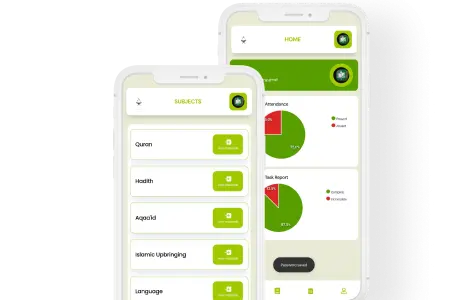
Teachers won’t use a desktop system. Ilmify is mobile-first. If a teacher can use WhatsApp, they can use Ilmify to record a session in under 2 minutes.
“Our data is in WhatsApp and Excel — migration will be a nightmare.”
It is usually a 2–4 hour task. Identify the minimum viable dataset: student name + parent contact + current position. The rest builds from day one of the new system.
How to Choose the Right System for Your Maktab
| Criterion | Why It Matters |
| Hifz tracking (3 streams) | Generic systems won’t have Sabak/Para/Dhor |
| Mobile-first interface | Teachers take sessions on phones, not PCs |
| Offline mode | Many mosque spaces have poor internet |
| Multi-language support | Urdu/Arabic support is essential for UK communities |
| Parent portal | Replaces WhatsApp for individual updates |
The Migration Process: 5 Simple Steps
- Audit (Week 1): List what data you have and where it lives (notebooks, WhatsApp).
- Set Up (Week 1–2): Create your profile, classes, and teacher accounts in Ilmify.
- Enter Data (Week 2): Enter student names and their current Quran positions.
- Train Teachers (Week 2–3): Run a 30-minute session on how to record attendance and Hifz.
- Go Live (Week 3–4): Retain old records for 7 years (compliance) but start all new entries in the system.
How Ilmify Makes the Transition Straightforward
- Onboarding support: The Ilmify team helps you import student data and configure settings.
- Mobile-first design: Designed for phone use; session recording takes under 2 minutes per class.
- Offline capability: Record data in mosque basements; it syncs when internet returns.
- GDPR compliance: Encrypted cloud infrastructure with no third-party data sharing.
- Multi-language: Support for English, Urdu, Tamil, Malayalam, and Arabic.
💡 Ready to leave WhatsApp and Excel behind?Ilmify onboards most maktabs in under a week — with support from the team.Start your Ilmify setup →
Frequently Asked Questions
Q: How long does it take to set up Ilmify for a maktab of 80 students?
A: Most complete initial setup within 3–5 hours of work, spread across 1–2 weeks.
Q: Can we keep using WhatsApp for parent groups?
A: Yes. Use WhatsApp for general announcements (e.g., “Masjid is closed for Eid”). Use Ilmify for student-specific info (Hifz progress, fees).
Q: What happens to our data if we stop using Ilmify?
A: You can export your student records, attendance, and fee history at any time. Your data is always yours.
Q: Do parents need to download an app?
A: Yes. The parent portal is accessed through the Ilmify app. Template messages are provided to help you explain this to parents.
Conclusion
WhatsApp and Excel served your maktab well in its early days. But as a complete administrative system for an institution managing dozens or hundreds of students, they are not adequate — legally or practically. The transition to proper software like Ilmify professionalises your institution and ensures student progress is never lost.
See how Ilmify replaces WhatsApp and Excel for your maktab →
Related articles in this series:




 Arabic
  English
  Malay
Malay  Urdu
Urdu