

Introduction
A handwritten Hifz register captures one thing well: where a student is today. It captures almost nothing else. It cannot tell you how fast a student has been progressing over the last three months, which portion of Dhor is consistently weak, whether Sabqi has been covered every day this week, or how a student’s progress compares to where they were at this point last year. And when the teacher who wrote that register leaves, the entire contextual history leaves with them.
A digital Hifz tracking system changes this completely. When every session is logged — Sabak covered, Sabqi recited, Dhor section completed, Tajweed notes added — the student’s entire Hifz journey becomes visible, searchable, and transferable. Teachers can spot patterns that a register cannot surface. Parents can see progress without calling the teacher. Administrators can identify at-risk students before they drop out. And when a student moves to a new school or a teacher changes mid-year, the new teacher picks up a complete record rather than a blank slate.
This guide walks through exactly how to set up a digital Hifz tracking system from scratch — the decisions you need to make, the structure you need to build, and the workflow teachers need to follow for the system to actually deliver its promise.
What a Digital Hifz Tracking System Should Do
Before choosing a tool or building a system, be clear about what you are trying to achieve. A good Hifz tracking system must:
| Capability | Why It Matters |
| Record Sabak (new lesson) per session | Tracks advancement and pace |
| Record Sabqi (recent revision) per session | Confirms consolidation is happening |
| Record Dhor/Manzil (older revision) per session | Ensures older material is not forgotten |
| Capture teacher’s Tajweed and quality notes | Surfaces patterns, enables correction history |
| Show each student’s cumulative progress | Reveals pace, gaps, and trends over time |
| Flag students who have missed revision tiers | Enables early intervention |
| Generate parent-readable progress reports | Builds parent trust and engagement |
| Transfer cleanly when teachers change | Protects institutional memory |
Any system that cannot do all eight of these is a partial solution. The most common failure is systems that track Sabak beautifully but have no mechanism for Sabqi and Dhor — which means they track advancement but not retention.
The Three-Tier Structure: Sabak, Sabqi, Dhor
The foundation of any Hifz tracking system is the three-tier revision model. Before configuring any software, every teacher and administrator must share the same understanding of these terms:
| Tier | Arabic | What It Covers | Typical Frequency |
| Sabak | سَبَق | Today’s new lesson — the fresh portion being memorised | Every session |
| Sabqi | سَبْقِي | Recent material — last 7–20 days, not yet in Dhor | Every session or alternate sessions |
| Dhor / Manzil | دَوْر / مَنْزِل | All older memorised material — cycled through on a schedule | Per schedule (daily section of older material) |
School-level decisions you must make before setup:
- How many days does Sabqi cover? Some schools use 7 days; others use 14 or 20. Decide and document this.
- How is Dhor cycled? Weekly cycle through all memorised material? Fortnightly? Per fixed schedule? Agree on a school-wide standard.
- What is the daily Sabak target? Half a page? One page? This should be defined by level (Qaidah students have different targets than Hifz students in Juz’ 20).
- How is quality recorded? A simple pass/needs-work binary? A three-point scale (excellent / acceptable / needs repeat)? Teacher notes in free text?
These decisions should be made by the school leadership and documented before any software is configured — because the system will be built around your answers.
Step 1: Define Your Tracking Framework
Timeline: 1 meeting (1–2 hours)
Gather your head teacher and senior teachers. Define and document the following:
Student levels and what is tracked at each level:
| Level | What Is Tracked |
| Qaidah | Letter recognition, short Surah recitation, basic Tajweed |
| Nazra | Surah/page coverage, Tajweed accuracy, reading speed |
| Hifz | Sabak (page/line), Sabqi (daily section), Dhor (scheduled Manzil), Tajweed quality |
Session recording requirements:
- What must be recorded every session (minimum: Sabak position)
- What is recorded when applicable (Sabqi coverage, Dhor section, Tajweed notes)
- How quality is assessed (pass/fail, 3-point scale, descriptive notes)
Document this as a one-page policy that every teacher receives. A tracking system only works if everyone is recording the same things in the same way.
Step 2: Choose Your Tool
Timeline: 1–2 days
Your options, from least to most suitable:
Option A: Spreadsheet (Google Sheets / Excel)
- Free; flexible
- No built-in Hifz structure — everything must be built manually
- No parent-facing access; no mobile app; data lives on one person’s drive
- Suitable for: Solo teachers tracking their own small group; not suitable for school-wide use
Option B: Generic school management system
- Designed for mainstream schools; no Islamic terminology
- No Sabak/Sabqi/Dhor framework; requires extensive workarounds
- Often expensive and over-featured for maktab needs
- Suitable for: Large Islamic schools with mainstream curriculum alongside Quran programme
Option C: Purpose-built Islamic school management software (e.g. Ilmify)
- Built specifically for maktabs and Hifz schools
- Sabak/Sabqi/Dhor tracking built in natively
- Parent portal, attendance, fees, and teacher management included
- Mobile-compatible; works across all regions
- Suitable for: Any maktab or Hifz school — from 20 to 500+ students
For any school with more than one teacher or more than 30 students, Option C is the correct choice. The time saved in the first month alone justifies the subscription cost.
Step 3: Set Up Your Student Profiles
Timeline: 2–4 hours
For each student, create a profile with:
Essential fields:
- Full name
- Date of birth / age
- Current level (Qaidah / Nazra / Hifz)
- Class group / teacher assigned
- Current Hifz position (Surah, Juz’, page number on 15-line Mushaf)
- Sabqi window start (i.e., which portion marks the beginning of their current Sabqi)
- Current Dhor schedule (which Manzil are they cycling through)
Parent contact fields:
- Parent/guardian name
- Mobile number
- Email address (for portal access)
- Preferred communication language
Fee fields:
- Monthly/termly fee amount
- Any outstanding balance
- Payment method preference
In Ilmify, student profiles include all of these fields with Islamic-specific options pre-built. The Hifz position is recorded in terms of Surah, Juz’, and page — not generic “lesson number.”
Step 4: Configure the Session Recording Workflow
Timeline: 30 minutes setup + teacher training session
The session recording workflow is the heart of the system. If teachers do not log sessions correctly and consistently, the system fails — regardless of how well it is configured.
Each teacher needs to record, for each student, at each session: code Codedownloadcontent_copyexpand_less
SESSION RECORD
──────────────────────────────────
Student: [Name]
Date: [Date]
Duration: [Time]

SABAK
□ Sabak covered today: [Surah + Page/Lines]
□ Quality: ✅ Ready to advance |  ️ Needs repeat | ❌ Hold

SABQI
□ Sabqi recited today: [Portion covered]
□ Quality: ✅ Solid |  ️ Hesitations noted | ❌ Significant gaps

DHOR
□ Dhor section today: [Manzil/Juz' covered]
□ Quality: ✅ Strong |  ️ Some errors | ❌ Needs focused revision

NOTES (Tajweed, behaviour, observations):
[Free text field]
──────────────────────────────────
This record takes approximately 2–3 minutes to complete per student per session. For a teacher with 10 students, that is 20–30 minutes of recording per day — which replaces the informal notes that previously took 30+ minutes to compile for a parent enquiry.
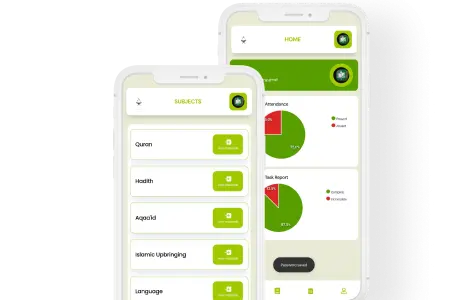
In Ilmify, this session record is a structured form on mobile — the teacher taps through the fields in under 2 minutes and the data is instantly visible in the school dashboard and parent portal.
Teacher training for session recording:
- Show the form on a shared screen
- Have each teacher record a practice session for a real student
- Review a real student’s record together to confirm it is complete
- Establish the expectation: sessions must be recorded on the day, not retrospectively
Step 5: Set Up Parent Reporting
Timeline: 30 minutes setup
Parent reporting is the most visible output of your Hifz tracking system — it is what parents experience and what builds their trust in the school’s professionalism.
Configure your parent reports to show:
- Current Hifz position (Surah, page)
- Pages/lines memorised this week / this month
- Sabqi and Dhor coverage for the period
- Teacher’s summary note (from session records)
- Attendance for the period
- Fee status
Parent access setup:
- Generate login credentials for each parent
- Send credentials personally (not in a group message)
- Provide a brief explanation of what they will see
- Include a contact for help with access
Report frequency:
- Weekly summary (automatically generated from session logs)
- Monthly detailed report (administrator reviews before sending)
- On-demand access (parent can check the portal any time)
Step 6: Build a Teacher Dashboard Habit
Timeline: Ongoing — first 4 weeks critical
The teacher dashboard is where patterns become visible. In the first month after setup, teachers and administrators should review the dashboard weekly to identify:
Sabak pace patterns:
- Is any student advancing unusually slowly (fewer than 3 pages/week when target is 5)?
- Is any student advancing unusually fast (which may indicate Sabqi is being rushed)?
Sabqi and Dhor gaps:
- Are there students with no Sabqi recorded in the last 5 days?
- Are there students whose Dhor has not been logged in 2 weeks?
Quality patterns:
- Are there portions that multiple students are struggling with? (May indicate a teaching issue, not a student issue)
- Is any student’s quality consistently declining? (Early warning of potential dropout)
The dashboard habit — a 10-minute weekly review — is what transforms the tracking system from a record-keeping tool into an active management instrument.
Step 7: Review and Optimise After One Month
Timeline: 1 meeting (1 hour) at 4-week mark
After one month of live operation, hold a review meeting with your teachers:
Questions to answer:
- Are teachers completing session records consistently? (Check: are there any days with missing records?)
- Is the Sabak target appropriate? (Are most students meeting it, or is it routinely missed/exceeded?)
- Is the Dhor schedule working? (Are students completing their assigned Manzil each week?)
- What is the parent response? (Are they logging in? Any feedback?)
Adjustments to make:
- If session records are inconsistent, simplify the recording form or reassign recording responsibility
- If Sabak targets are routinely wrong, adjust per student based on demonstrated capacity
- If Dhor is not being tracked, investigate whether teachers understand the system or whether the workflow is too burdensome
The month-one review prevents small problems from becoming system failures. A tracking system that nobody uses after the first month of novelty is worse than no system — it gives the appearance of management without the reality.
What Good Hifz Tracking Data Looks Like
After one term of consistent tracking, a well-configured Hifz system should allow you to answer these questions instantly:
| Question | What the Data Shows |
| Where is this student in their Hifz? | Current Sabak position — Surah, Juz’, page |
| How fast have they been progressing? | Pages per week over the last 3 months |
| Is their Sabqi consistent? | Days with Sabqi recorded vs total session days |
| Which Dhor portions are consistently weak? | Quality ratings for Dhor across multiple cycles |
| Have they missed sessions recently? | Attendance gaps in the session log |
| What do their Tajweed notes say? | Teacher observations from the last 10 sessions |
This data turns a Hifz school from a place where students memorise and hope for the best into a programme where every student’s journey is actively monitored, supported, and guided.
👉 Ilmify’s Hifz tracking system is built around Sabak, Sabqi, and Dhor — the framework your teachers already use.Setup takes a few hours. The benefits last for years.Set up your Hifz tracking with Ilmify → ilmify.app
Conclusion
A digital Hifz tracking system is not a luxury for large, well-funded Islamic schools. It is the minimum administrative infrastructure that any serious Hifz programme needs to serve its students well. The seven steps above — framework definition, tool selection, student setup, session workflow, parent reporting, dashboard habits, and monthly review — take under eight hours of total administrator time to implement. What they return is a programme that can see every student clearly, intervene early when things go wrong, and demonstrate its quality transparently to parents.
👉 Ready to build a Hifz tracking system that actually works? Explore Ilmify → ilmify.app
Related Articles:
- 📖 What Is Muraja’ah? The Islamic Science of Quran Revision
- 💻 How to Transition a Maktab from Paper to Digital: A 5-Step Migration Guide
- 📱 WhatsApp vs School Management Software: When to Upgrade Your Maktab
- 📊 Hifz Tracking Using Sabak, Sabqi, and Dhor — A Complete Guide
- 📬 How to Communicate Quran Progress to Parents Effectively
- 🏫 How to Start a Maktab: A Step-by-Step Guide for Mosque Committees




 Arabic
  English
  Malay
Malay  Urdu
Urdu