

Introduction
Every maktab administrator has experienced the moment. A parent asks: “How is my son doing with his Hifz?” And the answer requires physically locating a handwritten register, flipping back through pages, and trying to interpret shorthand notes written by a teacher who left last year. Or: a student leaves mid-year and the new school asks for their records — and the best the administrator can produce is a photocopy of a handwritten ledger.
Digitising a maktab does not mean replacing teachers with technology. It means replacing paper registers with searchable records, replacing WhatsApp fee reminders with structured payment tracking, and replacing end-of-term panic with always-current data. The result is a school that runs better — and a teacher and administrator team that spend their time teaching rather than chasing paperwork.
This guide walks through the transition process in five concrete steps. It assumes you are starting from a mostly paper-based system and working toward a functional digital management system without disrupting your ongoing Quran programme.
Why the Transition Feels Hard — and Why It Isn’t
The most common reason maktab administrators delay digitisation is not cost — it is the perception that transition will disrupt an already busy school. The registers work (just about). The teachers know the system (sort of). Changing it mid-year feels risky.
The honest reality: the disruption of transition is much smaller than the ongoing disruption of paper-based management. A school that spends three weeks in mild adjustment during a digital transition saves hundreds of hours of annual administrative friction from that point forward. The pain is front-loaded and finite; the gain is permanent.
The second reason is technical anxiety — administrators who are not particularly tech-confident worry they will configure something wrong, lose data, or confuse parents. This is addressed by choosing software that is genuinely simple to set up (not enterprise-grade school management systems designed for a 500-pupil secondary school) and by following a staged transition process rather than switching everything overnight.
What You Need Before You Start
Before beginning the transition, gather the following:
| Item | Details |
| Student list | Name, age, class/group, parent name, parent contact number |
| Hifz/Nazra progress records | Current Sabak position, Sabqi coverage, Dhor schedule if any |
| Attendance data | Last term or year’s attendance — can be entered retrospectively or started fresh |
| Fee records | Outstanding balances, payment history (even partial) |
| Teacher list | Names, classes assigned, contact numbers |
| School details | Official name, address, term dates |
You do not need all of this to be perfect before you start. Starting with incomplete data and filling it in progressively is fine — a digital system with 70% of the data is already more useful than a paper register with 100% of the data that nobody can access quickly.
Step 1: Audit and Compile Your Existing Data
Timeline: 1–3 days
Go through your existing paper registers and create a clean, simple spreadsheet or list with the following columns for each student: code Codedownloadcontent_copyexpand_less
Full Name | Age | Class/Group | Current Sabak Position | Parent Name | Parent Phone | Fees OwedDo not try to digitise everything at once. Prioritise:
- Active students — everyone currently enrolled
- Current Hifz position — where each student is in their Sabak, at minimum
- Outstanding fees — who owes what
Attendance history and older Hifz records can be added later or left as archived paper records. The goal of Step 1 is a clean, usable starting dataset — not a perfect historical archive.
Practical tip: If your registers have been maintained by multiple teachers with different handwriting and shorthand systems, designate one person to interpret and compile the data. Attempting to digitise confusing registers verbatim creates a confusing digital system.
Step 2: Choose the Right Software for an Islamic School
Timeline: 1–2 days research + decision
Not all school management software is suitable for a maktab or Islamic Quran school. Generic school management platforms are designed for government or mainstream private schools — they have no concept of Sabak, Sabqi, or Dhor, no Hifz tracking, and terminology that does not map onto Islamic educational practice.
When evaluating software for a maktab, look for:
| Feature | Why It Matters |
| Hifz/Quran progress tracking | Specific support for Sabak, Sabqi, and Dhor — not just “lesson progress” |
| Islamic terminology | Maktab, Ustadh, Hifz, Nazra, Qaidah — the software should speak your language |
| Simple parent communication | Progress reports that parents can access without a complicated login process |
| Fee management | Recording payments and tracking outstanding balances |
| Works on mobile | Most maktab teachers and parents use smartphones, not laptops |
| Affordable pricing | Designed for community-funded institutions, not commercial schools |
| Support for your region | Understands South Asian, Middle Eastern, or UK maktab contexts |
Generic platforms to avoid for maktab use:
- Full enterprise school management systems (too complex, irrelevant features)
- Systems with no Islamic-specific functionality
- Spreadsheet templates (better than paper but still manual and fragile)
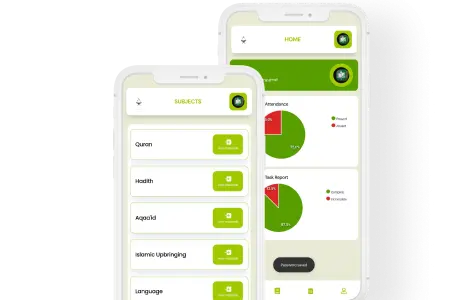
Purpose-built for Islamic schools: Ilmify is designed specifically for maktabs, madrasahs, and Hifz schools — with Sabak/Sabqi/Dhor tracking built in natively, Arabic and Islamic terminology throughout, and pricing calibrated for community institutions.
Step 3: Configure the System and Enter Your Data
Timeline: 2–4 hours
Once you have chosen your software, configuration follows a consistent sequence:
3a. Set up your school profile
Enter: school name, academic year, term dates, fee schedule.
3b. Add your teachers
Create a staff profile for each teacher. Assign them to their class groups. Configure what they can see (their own students) vs what administrators see (everyone).
3c. Create class groups / levels
Typically: Qaidah, Nazra, Hifz Year 1, Hifz Year 2 — or whatever grouping your school uses. In Ilmify, these map to the appropriate progress tracking mode (Qaidah tracking is different from Hifz tracking).
3d. Add students
Enter each student from your compiled list. Assign them to their class group, their teacher, and their current Hifz position.
3e. Set up fee structures
Define the monthly or termly fee amount per student or per class. Enter any outstanding balances from your audit.
Important: Do not try to do all of this in one session. Teachers add students to their own classes; the administrator sets up the overall structure. Dividing the data entry reduces the time and prevents one person becoming a bottleneck.
Step 4: Train Your Teachers and Run in Parallel
Timeline: 1–2 weeks
This is the most important step for a smooth transition. Teachers must understand:
- What they are recording — which sessions require which entries (Sabak confirmed, Sabqi covered, Dhor section today)
- How to record it — the specific clicks or entries in the system
- Why it matters — records that administrators and parents can access are more useful than records only they can read
Run paper and digital in parallel for 1–2 weeks. Teachers record sessions in both the paper register and the digital system. This serves two purposes: it ensures no data is lost if there is a configuration error, and it gives teachers time to build confidence with the digital system before paper is retired.
Training format that works:
- One 30-minute group session showing the teacher interface on a shared screen
- Each teacher enters 2–3 real student sessions as practice during the training
- A simple one-page reference card with the exact steps for recording each session type
Do not assume teachers will learn the system from a manual or a video. Direct, practical training — even if brief — is essential.
Step 5: Introduce Parents and Go Live
Timeline: 1 week for introduction; ongoing adoption
Parents are the last group to introduce — not because they are unimportant, but because a system that is not yet working smoothly internally should not be exposed to parents. Once teachers are confidently using the system (end of the parallel period), introduce it to parents.
Parent introduction message (template):
“Assalamu Alaikum dear parents. We are pleased to share that [School Name] has introduced a digital management system for our students’ progress. From [date], you will be able to log in to view your child’s Hifz progress, attendance, and fee status at any time. Login details are attached. We will continue to send important announcements via WhatsApp, but student-specific information will now be available through the portal. Please contact [admin name] if you need any assistance setting up your access.”
Parent adoption tips:
- Send login details personally to each parent, not in a group message
- Offer a brief demo at the next parent meeting or after a class session
- Be patient — adoption will be partial at first; most parents will log in within the first month
- Keep WhatsApp for broad announcements during the transition
Going live: Once parents have their login details and teachers are fully on the digital system, retire the paper register for day-to-day recording. Paper can continue as a backup if teachers prefer, but the digital system becomes the primary record.
What to Do After Going Live
The transition does not end at go-live. The first month after going live requires:
| Action | Frequency |
| Check that all teachers are logging sessions daily | Daily for first 2 weeks; weekly thereafter |
| Review outstanding fee records for accuracy | Weekly for first month |
| Follow up with parents who have not yet logged in | Week 2 and Week 4 after introduction |
| Export a backup of the student data | Monthly |
| Review Hifz progress dashboard for gaps | Weekly — identify students with no recorded sessions |
Within 6–8 weeks of going live, the system should be running autonomously — teachers log sessions, parents check progress, administrators monitor the dashboard, and the paper register is retired to storage.
Common Transition Mistakes
| Mistake | Consequence | Prevention |
| Trying to digitise historical records before going live | Delays the go-live indefinitely | Start with current data only; history can wait |
| Not running in parallel | Risk of data loss if errors occur | Always run parallel for at least 1 week |
| Introducing parents before teachers are confident | Parent queries overwhelm unprepared teachers | Train internally first; introduce parents last |
| Choosing generic software with no Islamic features | Requires workarounds; teachers resist using it | Choose Islamic-school-specific software |
| Expecting instant adoption | Frustration and abandonment | Set realistic expectations; 6–8 weeks for full adoption |
| No one person owns the transition | Confusion, inconsistency | Designate one administrator as transition lead |
👉 The transition from paper to digital is a three-week project that pays off for years.Ilmify is built specifically for maktabs — Islamic terminology, Hifz tracking, and all.Start your transition with Ilmify → ilmify.app
Conclusion
The shift from paper to digital management is one of the most impactful operational decisions a maktab can make — and it is far less disruptive than most administrators fear. The five steps above — audit, choose, configure, train, introduce — provide a clear roadmap from handwritten registers to a functioning digital system in under eight weeks. The result is a school that can answer a parent’s question about their child’s Hifz progress in thirty seconds, chase outstanding fees without awkward WhatsApp messages, and never again lose institutional knowledge when a teacher leaves.
👉 Start your maktab’s digital transition today. Explore Ilmify → ilmify.app
Related Articles:
- 📱 WhatsApp vs School Management Software: When to Upgrade Your Maktab
- 📊 How to Set Up a Digital Hifz Tracking System from Scratch
- 🏫 How to Start a Maktab: A Step-by-Step Guide for Mosque Committees
- 🇬🇧 GDPR for Maktabs and Islamic Schools: What UK Schools Must Know
- 📬 How to Communicate Quran Progress to Parents Effectively
- ⚙️ Best Maktab Management Software for UK Islamic Schools 2026




 Arabic
  English
  Malay
Malay  Urdu
Urdu